


VeivoVerse: AI Video Generator
3.614.00 Reviews
App Specs
- Version
- 2.4
- Updated On
- License
- Free
- Downloads
- 10,000+
- Developer
- WeTone
- Categories
- Photography
- Platform
- Android
Screenshots
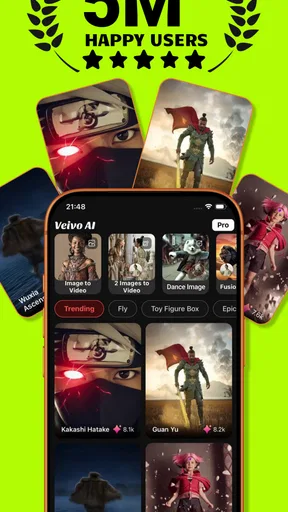
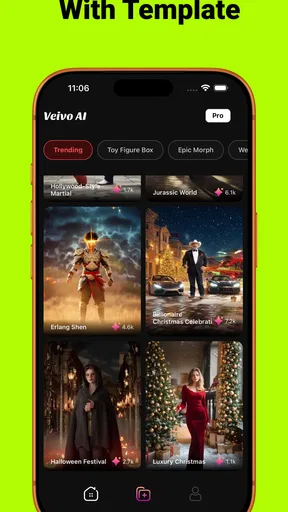
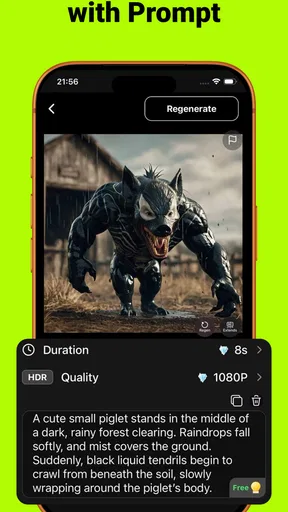
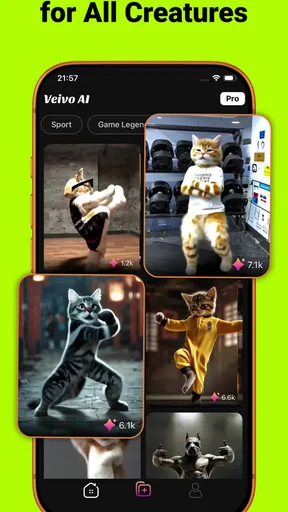

 Analysis by AppCompare
I approached VeivoVerse: AI Video Generator as a photography app for people who want to turn ordinary images into more expressive visual effects. Its store summary is brief, but the idea is easy to understand: instead of treating a photo as a finished snapshot, the app gives you a way to experiment with it and create something more animated or stylized. That makes it interesting for social posts, private projects, profile content, and quick visual experiments when a standard photo editor feels too predictable.
My first impression is that VeivoVerse is aimed at curiosity rather than professional production. It is free to install, marked for Everyone, and developed by WeTone. The current release is version 2.4, and it runs on Android 7.0 or later, which makes it accessible to a broad range of Android users. At the same time, the average rating sits at 3.6 from around 160 ratings, so I would not approach it expecting a universally polished experience. I see it more as a creative tool worth trying, especially if you enjoy testing visual ideas without committing to a complicated editing suite.
How VeivoVerse fits into everyday photo and video creation
The app makes the most sense when you begin with a photo that already has a clear subject. A portrait, a pet, a travel scene, or a product image gives an effect-based editor something recognizable to work with. If the original image is dark, crowded, or poorly framed, the result may feel less convincing regardless of the effect you choose. My practical advice is to start with a clean image, a distinct foreground subject, and enough visual separation from the background.
That workflow is different from using a traditional camera editor. Apps such as Lightroom-style editors are built around exposure, color, sharpness, and precise corrections. VeivoVerse is more appealing when the goal is transformation rather than restoration. I would use a conventional editor to fix a photograph first, then bring the improved image into an effects-focused tool like this one. That two-step approach can be more effective than asking one app to handle both technical correction and creative experimentation.
The app also occupies a different space from a full video editor. A timeline-based application is the better choice when I need multiple clips, deliberate cuts, captions, music, transitions, or exact control over duration. VeivoVerse appears better suited to a faster idea: take one image, apply a visual treatment, and see whether it becomes something worth sharing. That narrower purpose is a strength for casual use, but it is also the reason I would not recommend it as a replacement for a complete editing workflow.
A realistic use case: turning a quick photo into a shareable visual
Imagine taking a photo of a friend at a café and wanting something more memorable than the original camera shot. I would first choose the clearest version of the image, avoiding a frame where another person overlaps the subject’s face. Then I would test the effect that best matches the mood instead of applying several unrelated styles just because they are available. After reviewing the result, I would save the strongest version and compare it with the original before sharing it.
That last comparison matters. Effects can make an image feel more dramatic, but they can also hide the details that made the photo appealing in the first place. For portraits, I would pay particular attention to eyes, hair, hands, and the outline of the face. For pets, I would inspect the ears and fur. For scenery, I would check whether the horizon and major edges remain coherent. These checks take only a moment, yet they help separate a fun result from one that looks visibly broken.
Worth Reading Before You Choose

EA SPORTS FC Mobile 26 Is a Bigger Football Game, but It Takes Time

Flipboard Shows What News Apps Must Do Beyond the Feed

Switching to Android Auto Means Rethinking Your Driving Routine

Google Calendar Makes a Crowded Week Easier to Manage

Ludo King Makes the Most of the Minutes Between Plans

Baby Panda World Brings Quick Play to Modern Phones, but Its Game Library Feels Busy
Another useful scenario is creating a visual variation for a small online post. If I have already written the caption and only need an eye-catching image, an effects app can save time compared with building a design from scratch. I would still keep the original file untouched and export a copy for experimentation. This is especially important when an effect changes the image in a way that cannot easily be reversed.
What the current release tells me about the product
Version 2.4 is the clearest current marker of the app’s development stage. It suggests that VeivoVerse has moved beyond a first public build and is being maintained as an ongoing product. I would interpret that as a reason to test it rather than dismiss it immediately, but not as proof that every part of the experience is mature. A version number alone cannot tell me how stable a particular effect is, how quickly images process, or how consistently results look across different phones.
The app was released on March 8, 2026, so its public history is still relatively new. That context helps explain why the experience may feel like a work in progress to some users. Newer creative apps often need time to refine their effect selection, processing behavior, export flow, and compatibility across devices. I would judge the current version on what it does today while keeping expectations realistic about how quickly the product may change.
Its reach also remains modest, with over ten thousand installs. That does not automatically make the app unreliable, but it does mean the user community is smaller than the audience around long-established photography tools. For me, a smaller audience makes the rating worth reading as a signal rather than a final verdict. The 3.6 average suggests mixed experiences: some people likely find the concept enjoyable, while others may encounter limitations that matter during regular use.
The pricing model deserves attention before anyone builds a routine around the app. VeivoVerse is free to install, but its in-app purchases range from $2.49 to $199.99 per item. That is a very wide span, and it changes how I would explore the app. I would try the basic experience first, check what is available without paying, and avoid assuming that every visible creative option belongs to the free portion. Anyone who dislikes surprise spending should review each purchase prompt carefully before confirming it.
How existing users may feel the effect of version changes
If you have already used VeivoVerse, the move to version 2.4 is most relevant as a sign that the app may continue evolving. Existing users should expect the interface, effect organization, or processing behavior to change over time rather than treating one session as permanent. I would keep copies of finished images outside the app and avoid relying on the application as the only place where important creations are stored.
For occasional users, that is probably a minor inconvenience. Someone who opens the app once in a while to create a playful image can simply adapt to the current layout each time. Regular creators may notice changes more sharply, especially if they have developed a repeatable sequence for selecting an image, applying an effect, and saving the result. My recommendation is to document your favorite workflow in simple terms, including the original image location and the final export location, so a future interface change does not interrupt the process.
There is also a quality-control lesson for returning users. When an app changes, I would not assume that an effect behaves exactly as it did before. I would test a familiar image and compare the new output with an older result. This is a practical way to spot changes in composition, detail, or overall style without relying on memory. It is particularly useful if you use the app for a consistent social feed or a repeated personal project.
The rating provides another reason to keep expectations measured. Around 160 ratings and 14 reviews do not create a large enough public record for me to treat every opinion as representative, but they do show that the experience is not uniformly praised. I would install it with the mindset of evaluating it on my own phone, using my own images, and deciding whether the results justify continued use.
Three workflows that make the app more useful
My first recommended workflow is the “clean original” method. Before opening VeivoVerse, I would crop away distractions, correct obvious brightness problems in another editor if necessary, and choose a file with a clear subject. This is not just cosmetic preparation. Effects have less visual noise to interpret, so the final image has a better chance of retaining the identity of the original scene.
The second is the “one variable at a time” method. Rather than changing the source image, effect, crop, and output format all at once, I would keep the source constant while comparing different creative treatments. That makes it easier to tell whether a result is genuinely better or merely different. It also prevents the common mistake of choosing the most dramatic preview even when it damages the subject.
The third is the “private draft” method. I would create several versions, save them privately, and review them later instead of sharing the first result immediately. A visual effect can seem exciting during the creation moment and feel excessive after a short break. This approach is particularly helpful for profile images, invitations, small business posts, or anything where the image needs to look intentional rather than experimental.
A fourth trade-off is worth mentioning for people using older devices. Because the minimum operating system is Android 7.0, the app is not restricted to only recent phones. However, operating-system compatibility does not guarantee identical performance on every device. I would leave patience for image processing and avoid starting several creations at once if the phone has limited free storage or memory. The app may be accessible on older hardware, but the smoothest experience is never something I would assume from the operating-system requirement alone.
Where the app still falls short
The biggest limitation is its narrow creative role. If I need reliable color correction, layers, masking, typography, or detailed retouching, I would choose a more established photo editor. If I need a finished video assembled from multiple scenes, I would choose a timeline editor. VeivoVerse is most attractive between those two extremes: it offers a quick way to explore effects, but it should not be mistaken for a complete production environment.
The purchase range is another point of friction. A free starting point is helpful, but the upper end of the listed purchase range is substantial enough that I would not explore casually without checking the payment screen. This matters for families too. Although the content rating is Everyone, an age-friendly content label does not mean every purchasing decision should be left unattended. Parents may want to supervise purchases, and any user should know which creative options require payment before investing time in a particular style.
The mixed rating also makes me cautious about recommending it to someone who needs dependable results every time. A casual creator can tolerate an occasional weak output or a little experimentation. A freelancer working against a deadline cannot. For professional work, I would keep a second tool ready and treat VeivoVerse as an idea generator rather than the only production option.
I would also skip it if my main interest is preserving a natural photographic look. The more transformation an effect introduces, the more likely it is to move away from documentary accuracy. That is not a flaw when the goal is imagination, but it becomes a problem for family records, product documentation, real-estate images, or any situation where visual truth matters more than style.
What I would watch as WeTone continues developing it
Since the app is still relatively new and currently at version 2.4, I would watch how WeTone handles consistency from one release to the next. The most meaningful progress would be easy-to-understand effect organization, predictable output, and a saving process that keeps the original image safe. Those improvements would help both newcomers and returning users without changing the app’s basic creative identity.
I would also pay attention to how clearly the app separates free tools from paid options. The price range makes transparent prompts especially important. A good experience should let me understand what I am testing before I spend money, and it should make it easy to abandon an effect without losing my original work. Clear choices are more valuable here than simply adding a larger collection of styles.
Another thing I would monitor is whether VeivoVerse becomes better at serving repeatable workflows. One-off experimentation is already the obvious appeal, but regular users benefit from being able to recreate a look for a series of images. Consistency would make the app more useful for creators who want a recognizable visual theme rather than a collection of unrelated experiments.
For now, I see VeivoVerse as a low-commitment photography app with a creative focus and a sensible place in an Android user’s secondary toolkit. It is free to try, supports older Android versions, and offers a quick alternative to opening a full editing suite for every small visual idea. I would recommend it to curious users who enjoy transforming photos and are comfortable judging results one image at a time.
I would not recommend making it your only editor, relying on it for deadline-sensitive work, or approving purchases without checking the details. The mixed 3.6 average and the broad in-app purchase range call for a little caution. Still, if you want to see how your photos might look after a more imaginative treatment, VeivoVerse is worth testing with a few disposable copies of your images. My final view is positive but measured: it is best approached as an evolving effects playground, not as a replacement for the dependable tools already used for serious photo and video editing.
Pros
- Creates videos quickly from simple text prompts.
- Useful for brainstorming social media content and visual concepts.
- AI-generated visuals can add variety to short-form projects.
- Simple workflow makes it approachable for beginners.
- Cloud-based generation avoids demanding device hardware.
Cons
- Results may vary significantly depending on the prompt.
- Some videos can contain visual glitches or inconsistent details.
- Advanced editing controls may be limited compared with full editors.
- High-quality generations may require credits or a paid plan.
- Processing times can increase during busy periods.
FAQs for VeivoVerse: AI Video Generator
What is VeivoVerse: AI Video Generator, and what can I use it for?
VeivoVerse: AI Video Generator is designed to help users create short videos with the assistance of artificial intelligence. Depending on the available tools, you can typically turn written prompts, images, or ideas into visual clips, then use them for social media posts, creative projects, presentations, storytelling, or experimentation. It is especially useful for people who want to produce video content without advanced editing experience.
Is VeivoVerse suitable for beginners without video-editing experience?
Yes, VeivoVerse is aimed at making AI-assisted video creation accessible to beginners. The app generally guides you through entering a prompt, selecting a style or format, and generating a result without requiring a traditional timeline-based editing workflow. However, the quality of the final video can depend heavily on how clearly you describe your idea, so some trial and error may be necessary before achieving the desired result.
Does VeivoVerse: AI Video Generator require a subscription or include in-app purchases?
Users should check the current pricing information on the official Google Play Store or Apple App Store listing before downloading. AI video generation can involve usage limits, credits, premium styles, faster processing, watermarks, or subscription plans. The free version, if available, may offer only a limited number of generations. Review the trial terms, renewal conditions, and cancellation process carefully before starting any paid plan.
Can I use the videos created with VeivoVerse for commercial purposes?
Commercial usage depends on VeivoVerse’s current terms of service, the selected plan, and the source material used to create each video. Before using generated content in advertising, client work, monetized channels, or business campaigns, verify whether your subscription grants commercial rights. You should also avoid uploading copyrighted images, logos, music, or identifiable personal content unless you have the necessary permissions.
What should I know about privacy and uploading content to VeivoVerse?
Because VeivoVerse may process prompts, images, videos, or other files through cloud-based AI systems, privacy is an important consideration. Read the app’s privacy policy to understand what information is collected, how long uploaded content may be stored, and whether data is used to improve services. Avoid submitting confidential documents, sensitive personal images, private client materials, or content that you would not want processed online.


